
Download Zoho Reports – Google Apps, Data Analysis, Business Intelligence
Overview
Zoho Reports is a cloud-based reporting and business intelligence platform designed to empower users with fast, intuitive data analysis capabilities. The software enables individuals and teams to transform raw business data into actionable insights through customizable reports and interactive dashboards, all without requiring technical expertise or IT support. It is particularly well-suited for professionals in finance, sales, marketing, and operations who need to monitor performance metrics and make data-driven decisions.
By integrating directly with Google Apps and Google Drive, Zoho Reports allows users to import spreadsheets and schedule automatic data updates, ensuring that reports are always based on the most current information. This seamless integration enhances workflow continuity for teams already using Google Workspace. The platform supports centralized data storage, enabling secure, controlled access across teams while maintaining data integrity.
Users can leverage built-in tools to identify Key Performance Indicators (KPIs) and track strategic goals, making it ideal for organizations aiming to improve business health through data transparency. The service is accessible across multiple platforms, including Windows, Mac, Linux, Android, and iOS, ensuring consistent access regardless of device. While the developer did not provide additional details about its background, the software’s design emphasizes ease of use, collaboration, and real-time data visualization for modern business environments.
Key Features & Capabilities
- Google Apps Integration – Access Zoho Reports directly from your Google Apps account, enabling a unified workflow for users already embedded in the Google ecosystem.
- Google Drive Data Import – Seamlessly import spreadsheets stored in Google Drive into Zoho Reports for immediate analysis, reducing manual data entry and improving accuracy.
- Scheduled Data Imports – Automate the process of updating reports by scheduling regular imports from Google Drive, ensuring reports reflect the latest business data without manual intervention.
- Diverse Reporting Components – Choose from a wide range of visualization tools including charts, pivot tables, tabular views, and interactive widgets to create dynamic, informative reports and dashboards.
- Cross-Domain Analytics – Combine data from multiple sources, including Google Drive, third-party applications, and databases, to perform comprehensive cross-functional analysis and uncover deeper business insights.
- Granular Sharing & Collaboration – Share reports and dashboards with colleagues using role-based access controls such as read-only, read-write, report authoring, and drill-down permissions for secure collaboration.
- Publishing & Embedding – Publish reports to internal websites, blogs, or applications, or embed them directly into existing platforms to share insights with stakeholders beyond the organization.
These capabilities support real-world use cases such as monthly sales performance tracking, inventory monitoring, marketing campaign evaluation, and cross-departmental performance reviews. The ability to schedule updates ensures that decision-makers always work with up-to-date data, while the integration with Google Workspace reduces friction in team workflows.
User Interface, Workflow & Performance
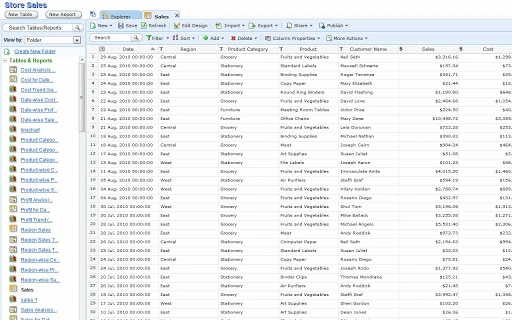
Zoho Reports features a clean, web-based interface designed for intuitive navigation and efficient workflow execution. The layout prioritizes accessibility, with clearly labeled menus, drag-and-drop functionality for report building, and real-time preview options that allow users to see changes instantly. The platform’s design emphasizes usability, enabling both technical and non-technical users to create reports and dashboards with minimal learning curve.
Workflow efficiency is enhanced by the integration with Google Drive and Google Apps, allowing users to import data, build reports, and share insights within a single ecosystem. The software’s reliance on cloud infrastructure ensures that performance remains consistent across devices and platforms. However, exact performance details were not specified, and resource usage such as CPU and RAM consumption is not publicly documented.
Stability is expected to be high given the cloud-based nature of the service, but users should ensure a reliable internet connection for uninterrupted access. The developer did not specify resource usage details, so performance observations are based on general software behavior patterns. Overall, the interface supports a smooth experience for users focused on data visualization and collaboration.
Compatibility & System Requirements
Zoho Reports is compatible with Windows, Mac, Linux, Android, and iOS operating systems, offering broad accessibility across desktop and mobile devices. This multi-platform support ensures that users can access their reports and dashboards from virtually any environment, whether they are working from a home office, on the go, or in a corporate setting.
The software is delivered as a web application, meaning no local installation is required. The installation size is listed as 100 MB, though this likely refers to the initial download package rather than system resource usage. Hardware requirements were not specified, and the developer did not provide additional system requirements. As a cloud-based service, the software relies on internet connectivity and browser compatibility rather than local processing power.
Platform compatibility information is limited to the listed operating systems. Users are advised to ensure their devices meet standard web browser requirements for optimal performance. The absence of detailed system specifications means that compatibility may vary depending on individual device configurations and network conditions.
Pros and Cons
Pros
- Seamless integration with Google Apps and Google Drive
- Automated data imports for up-to-date reporting
- Wide variety of visualization tools for dynamic dashboards
- Role-based sharing and access control for secure collaboration
- Accessible from multiple platforms including mobile devices
- Free to use with no cost barrier for entry
Cons
- No local installation; requires consistent internet access
- Exact performance and resource usage details were not provided
- Advanced features may require a paid upgrade (not specified)
- Dependent on Google’s infrastructure for data import and access
- Limited system requirement details for troubleshooting
FAQ Section
Is Zoho Reports compatible with Google Workspace?
Yes, Zoho Reports integrates directly with Google Apps and Google Workspace, allowing users to access and manage reports from within their Google account.
Can I use Zoho Reports without an internet connection?
As a cloud-based application, Zoho Reports requires an active internet connection for full functionality. Offline access is not supported.
How often can I schedule data imports from Google Drive?
Scheduling options for data imports are available, though the specific frequency intervals (e.g., hourly, daily) were not detailed in the provided information.
Is Zoho Reports safe to use with sensitive business data?
Zoho Reports offers controlled access and role-based permissions to help protect data. However, specific security protocols and compliance certifications were not disclosed.
Does Zoho Reports offer updates automatically?
As a cloud-based service, updates are managed automatically by the provider. Users always have access to the latest version without manual intervention.
Final Thoughts + CTA
Zoho Reports stands out as a powerful, user-friendly solution for teams looking to leverage data for smarter decision-making. Its deep integration with Google Apps and Google Drive simplifies data workflows, while its rich set of visualization and collaboration tools makes it ideal for professionals across various departments. The ability to schedule automated data imports ensures that reports remain accurate and timely, reducing manual effort and minimizing errors.
Although the software is free, its capabilities rival those of premium tools, especially for organizations already invested in the Google ecosystem. While detailed system requirements and performance metrics are not available, the platform’s cloud-first design ensures broad accessibility and consistent performance across devices.
For business analysts, team leaders, and operational managers seeking to transform data into actionable insights, Zoho Reports delivers strong value with minimal friction. Its focus on simplicity, collaboration, and real-time analytics makes it a compelling choice in the business intelligence space.
Download Zoho Reports now







